
01
Work ends. The little things keep coming.
A busy home office makes it easy to lose errands between meetings.
Keep a short desktop checklist in view. In Pro, give the important things a reminder time.
Try SmileNote Free →
A little space for a clearer day.
Desktop sticky notes for the little things. Reminders, focus time and tree-shaped projects for everything that grows from them.
Windows 10 / 11 · x64 · One-time purchase. No subscription.
MADE FOR THE WAY YOU LIVE
A shopping list, a chapter to read, a new place to call home. Small notes can hold surprisingly big plans.
A busy home office makes it easy to lose errands between meetings.
Keep a short desktop checklist in view. In Pro, give the important things a reminder time.
Try SmileNote Free →
Measurements, shopping lists and move-in documents end up scattered everywhere.
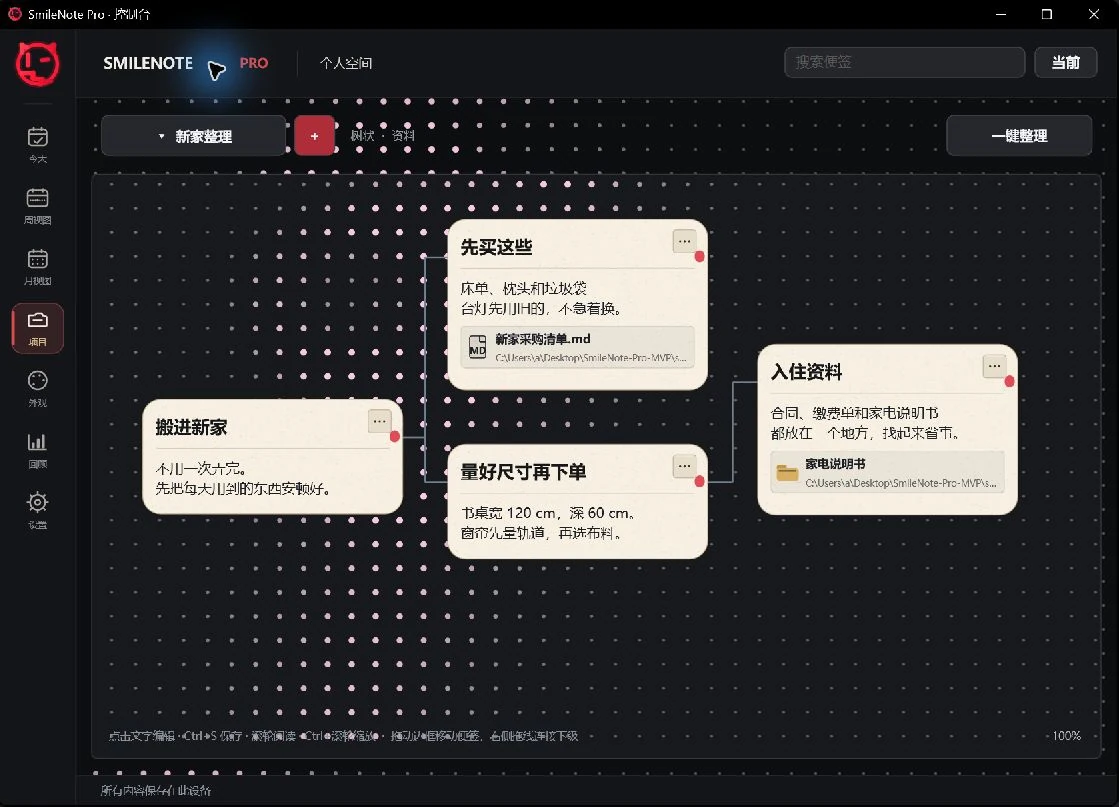
Connect them in a Pro tree project. Add document and folder links beside the relevant note.
Pro →
A long reading plan feels bigger when there is no clear next step.
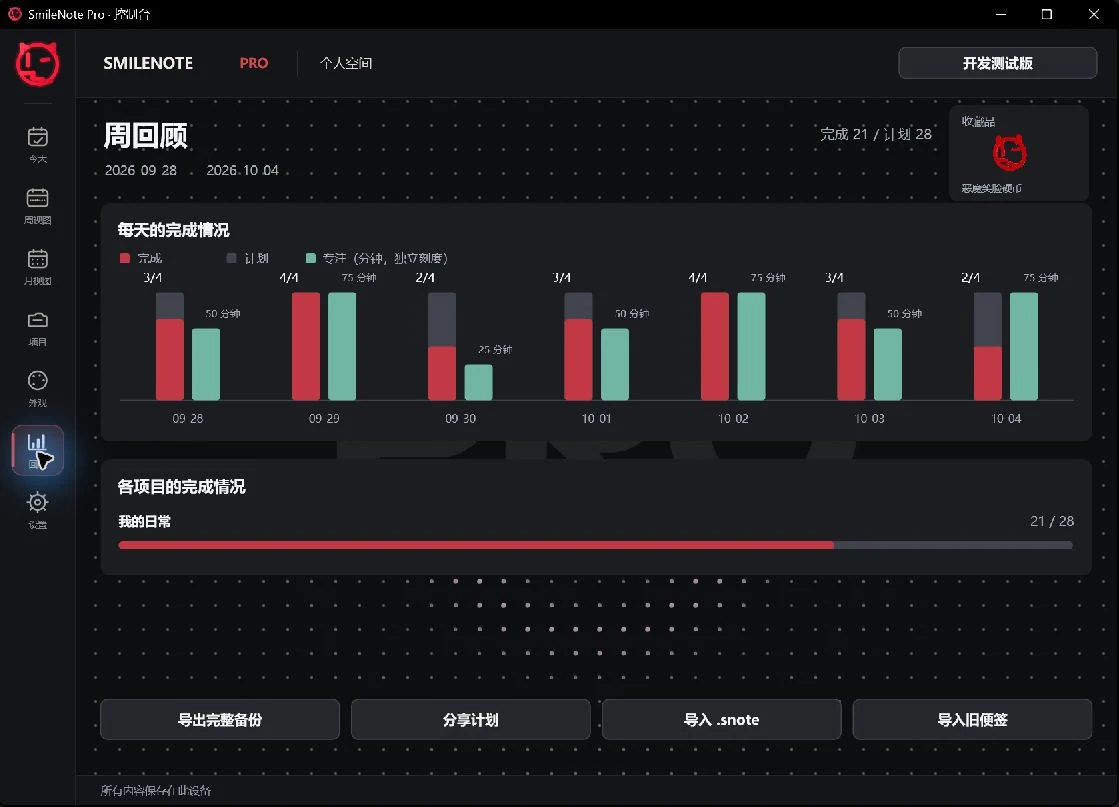
Arrange dated tasks, focus for a chosen duration, then review completed tasks and focus time separately.
Pro →FROM A QUICK NOTE TO A CONNECTED PLAN
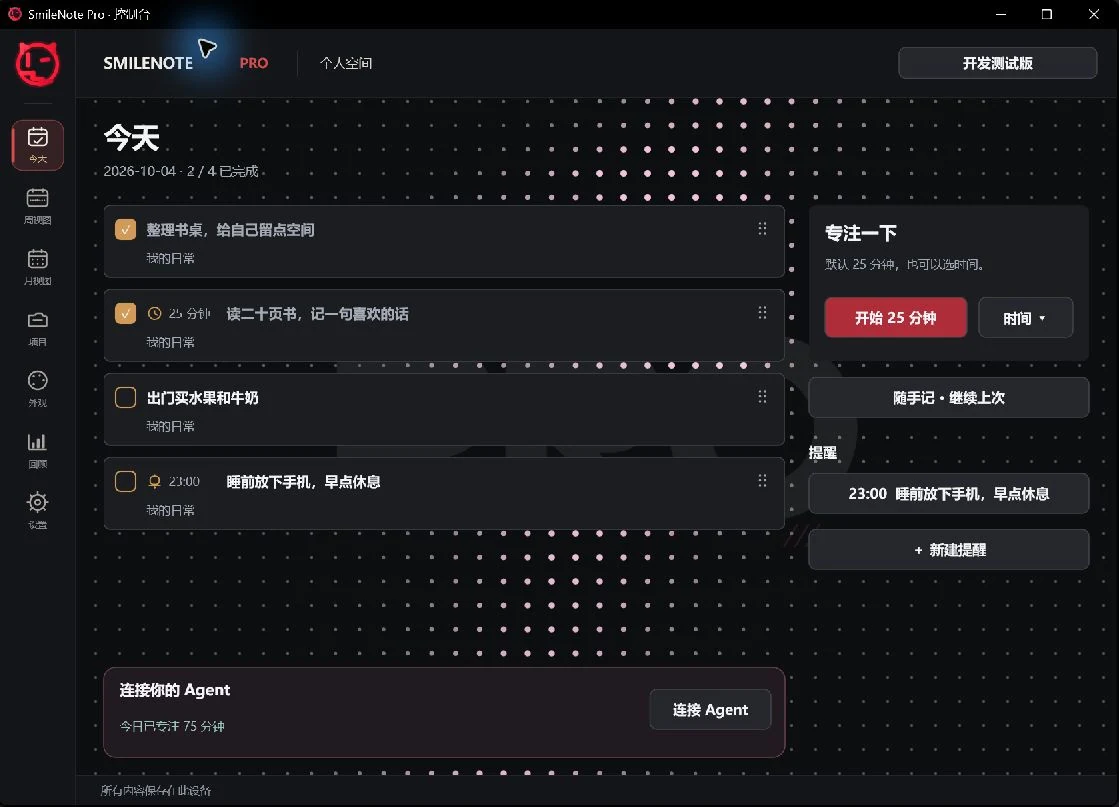
Check off tasks, reorder them and come back to the next small thing. Pro adds Today, week and month views.
Flat projects for plans. Hierarchical notes for references. Tree projects keep related ideas and file links together.
Pro weekly review shows task progress and focus time in separate bar statistics. Time spent is not a completed task.
YOUR NOTES. YOUR CHOICE.

A lightweight desktop notepad for quick capture, simple tasks and a smile that stays out of your way.

A notes organizer for dated plans, local reminders, focus sessions and a connected collection of reference material.
| Feature | SmileNote Free | SmileNote Pro |
|---|---|---|
| Notes & writing | ||
| Floating desktop notes | Titles and task lists | Task notes and free-form quick notes |
| Tasks & reminders | ||
| Check off and reorder tasks | Check off; drag task numbers | Check off; handles in dated lists |
| Today, week and month views | Not included | Included |
| Timed reminder tasks | Not included | Bell, time and task; app must be running |
| Focus timer | Not included | 25-minute default; selectable duration |
| Projects & reference material | ||
| Flat and tree layouts | Not included | Parent–child links, move, zoom and arrange |
| Review & statistics | ||
| Weekly review bars | Not included | Task progress and focus time separately |
| External agents | ||
| Local MCP for external agents | Not included | Compatible Codex, Claude Code and other clients |
| Data & access | ||
| Purchase access | Free; no timed trial | One-time Store purchase; license verification |
SMILENOTE PRO
One-time purchase. No subscription.
Regional price examples supplied by the developer. Final price and availability are shown in Microsoft Store. Language does not determine your market.
US$9.59
Get Pro on Microsoft StoreNo. Use SmileNote Free as the way to try the everyday experience. It has its own feature set; installing it does not unlock Pro.
Everyday notes and organization are local. Pro installation and purchase-license checks or recovery may need Microsoft Store access. External AI may require internet access.
No. Pro provides a local MCP connection to a separately configured compatible agent. Any external AI subscription or usage charges are separate.
No. The app must be running and Windows must be able to notify you. It is not a background cloud reminder service.
No. Document, audio and folder cards link to the original location. Moving or deleting the original can break that link. Imported images are stored with the workspace.
Start with a note. Build a plan when you are ready.
Windows 10 / 11 · x64 · One-time purchase. No subscription.